JavaScript
JavaScript Iterate Over Array: Proven Patterns for 2026
for, for...of, forEach, map, filter, reduce and custom iterators — which array iteration pattern fits the job, and where each one starts fighting you.
You open a ticket, the array is already there, and the core question isn't “how do I loop?” It's “what am I trying to do with each item?” That's the difference between writing clean JavaScript and copy-pasting a loop shape that fights the work. If you're trying to summarize order objects, build a new list of display labels, stop at the first match, or just fire side effects for every record, the right array iteration method changes with the job.
What You Are Actually Trying to Do When You Iterate
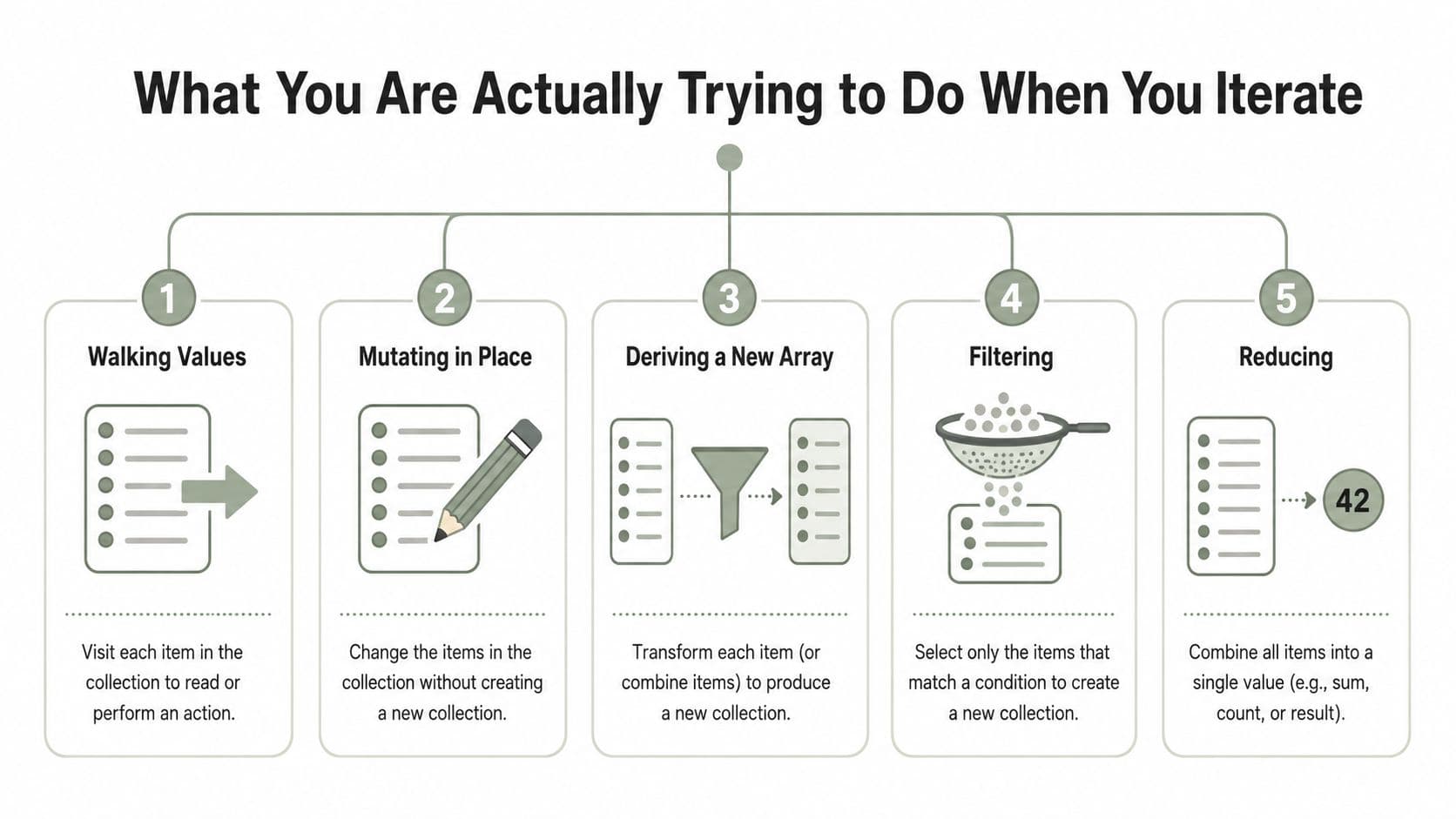
A junior dev usually reaches for the first method they remember, then discovers the method and the task don't line up. A ticket might ask for something simple like “show the active orders,” but under the hood you may need to walk values, mutate in place, transform into a new array, filter down, or fold into a single result. Those are five different jobs, and JavaScript gives you different tools for each one.
Start with the job, not the syntax
If the task is “inspect every item and maybe log something,” you're in side-effect territory. If the task is “build a new list of titles from objects,” you want mapping. If the task is “keep only paid orders,” you want filtering. If the task is “compute a total, build a lookup object, or count statuses,” that's reduction.
A common Codeffice-style ticket might look like this. A list of cart items comes in, and you need to label each one, remove invalid entries, then produce a grand total for the sidebar. That's not one loop problem, it's three separate iteration jobs, and trying to force one method to do all of them usually makes the code harder to test and harder to change later.
Practical rule: choose the loop after you know the shape of the output. A new array, a single value, or no returned value at all points you to different methods.
The mental checklist that saves time
Before you write anything, ask four quick questions.
- Do I need indices? If yes, an indexed
forloop is usually the cleanest fit. - Do I need a new array? If yes, look at
maporfilter. - Do I need one final value? If yes,
reduceis the natural fit. - Do I need to stop early? If yes, avoid callback-only helpers that can't break cleanly.
That checklist keeps array work from turning into trial and error. It also matches what happens in production code, where the iteration method matters less than whether it matches the ticket's outcome.
The Classic for Loop and for...of Side by Side
A cart review ticket comes in, and you need to walk every item, skip a few bad records, then stop the moment you find a blocked SKU. That is the kind of job where the old indexed for loop still earns its place. It gives you exact control over the index, the current value, and the exit point, which is why it remains the cleanest choice when the loop itself is part of the work.
for...of shifts the focus to values. It iterates over any iterable, not just arrays, and it does so in order, one item at a time MDN on for...of. If the ticket is “inspect each record and act on it,” that reads more naturally than carrying around an index you do not need.
Indexed control when the ticket needs it
Use the classic loop when the index is part of the solution. Scanning backward, comparing the current element with the previous one, or mutating positions in place all fit that model well. It also gives you break and continue without any awkward workarounds, which matters the moment the loop has to stop early or skip specific entries.
That is why I still use it for jobs like “walk the array from the end, find the last valid order, and stop there.” The code is a little more verbose, but the control flow is obvious, and no one has to guess how the loop behaves.
A small habit helps here. If the array will not change inside the loop, cache array.length before the loop starts. It keeps the loop intent clear and avoids re-reading the same property on every pass.
Value-first iteration with for...of
Use for...of when the item matters more than its position. It keeps the loop body focused on the work, which is useful for tickets like “send each customer name to the formatter” or “check every order and log the ones that fail validation.” You get less index noise and fewer chances to write code that only exists to satisfy the loop syntax.
When you do need the index, entries() gives you both the position and the value without switching back to the indexed style. That makes for...of flexible enough for mixed cases, like when a ticket asks you to label items with their place in the list while still treating each value as the main thing. For day-to-day array work, that balance is often the better trade-off.
The practical split is simple. Use the indexed for loop when the index drives the algorithm. Use for...of when you want to read values in order and keep the loop body focused on the ticket itself.
When forEach Is the Right Callback and When It Bites Back
forEach() is the callback-style loop most developers meet early, and it's great when the job is side effects. Logging each item, incrementing a counter, pushing telemetry, or updating outside state all fit that pattern well. If the ticket says “touch every record and do something for each one,” forEach() often reads cleanly.
Use it for side effects, not control flow
The cleanest forEach() work is simple and complete. You're not trying to return a new list from it, and you're not trying to stop halfway through based on a condition. It's a decent choice when every item needs the same follow-through and there's no cancellation logic hiding in the ticket.
The problem starts when a junior dev reaches for forEach() because it feels familiar, then later discovers the workflow needs a break, continue, or early exit. forEach() can't be terminated that way, and the only way out is to throw an exception from inside the callback, which is a terrible fit for normal control flow. That's why it's a poor choice for “stop at the first matching order” or “exit once validation fails.”
Watch out for sparse arrays
forEach() also skips empty slots in sparse arrays. That can be fine, or it can create subtle bugs if your code depends on every index being touched. If you're auditing data imported from a weird source, skipping holes is sometimes a feature and sometimes a trap.
The practical guidance is simple. Use forEach() when the loop is about side effects and full completion matters. Don't use it when you need short-circuiting, cancellation, or stepwise control over each iteration. In those cases, the indexed for loop or for...of is the honest tool.
Map, Filter, and Reduce on the Same Dataset
These three methods get mixed up because they all look like “loop helpers,” but they're doing different jobs. map() changes each value into a new value. filter() keeps only the items that pass a condition. reduce() collapses the whole array into one accumulated result.
The same input, three different outputs
Take the same order list and run three different tickets against it. If you need display names for a UI, map() gives you a new array of labels. If you need only the paid orders, filter() gives you a smaller array. If you need the total revenue or a grouped summary, reduce() gives you one result object or number.
That difference is why these methods matter. They encode intent. A reviewer can see the return shape immediately, which is cleaner than reading a hand-written loop and reverse-engineering what it's doing.
| Method | Returns | Creates new array | Best for |
|---|---|---|---|
| Map | A new array of transformed values | Yes | Converting one list into another list |
| Filter | A new array containing matching items | Yes | Keeping only values that meet a condition |
| Reduce | A single accumulated value | No | Totals, grouping, counts, and summaries |
Chaining beats overloading one loop
A lot of practical code chains filter() and map() because the ticket really is “keep these records, then transform what's left.” That's usually easier to read than stuffing both concerns into one custom loop. You can also use reduce() for almost anything if you're determined enough, but that doesn't mean you should.
Good style: use the method whose return value matches the output you need. Don't use
reduce()just because it can do everything.
When each method becomes awkward
map() is awkward if you don't want a new array. filter() is awkward if you need a running total. reduce() is awkward if your team has to read the code quickly and the accumulator is doing too much work. In a ticket review, the simplest readable version usually wins unless the code is on a true hot path.
Performance Notes You Should Actually Care About
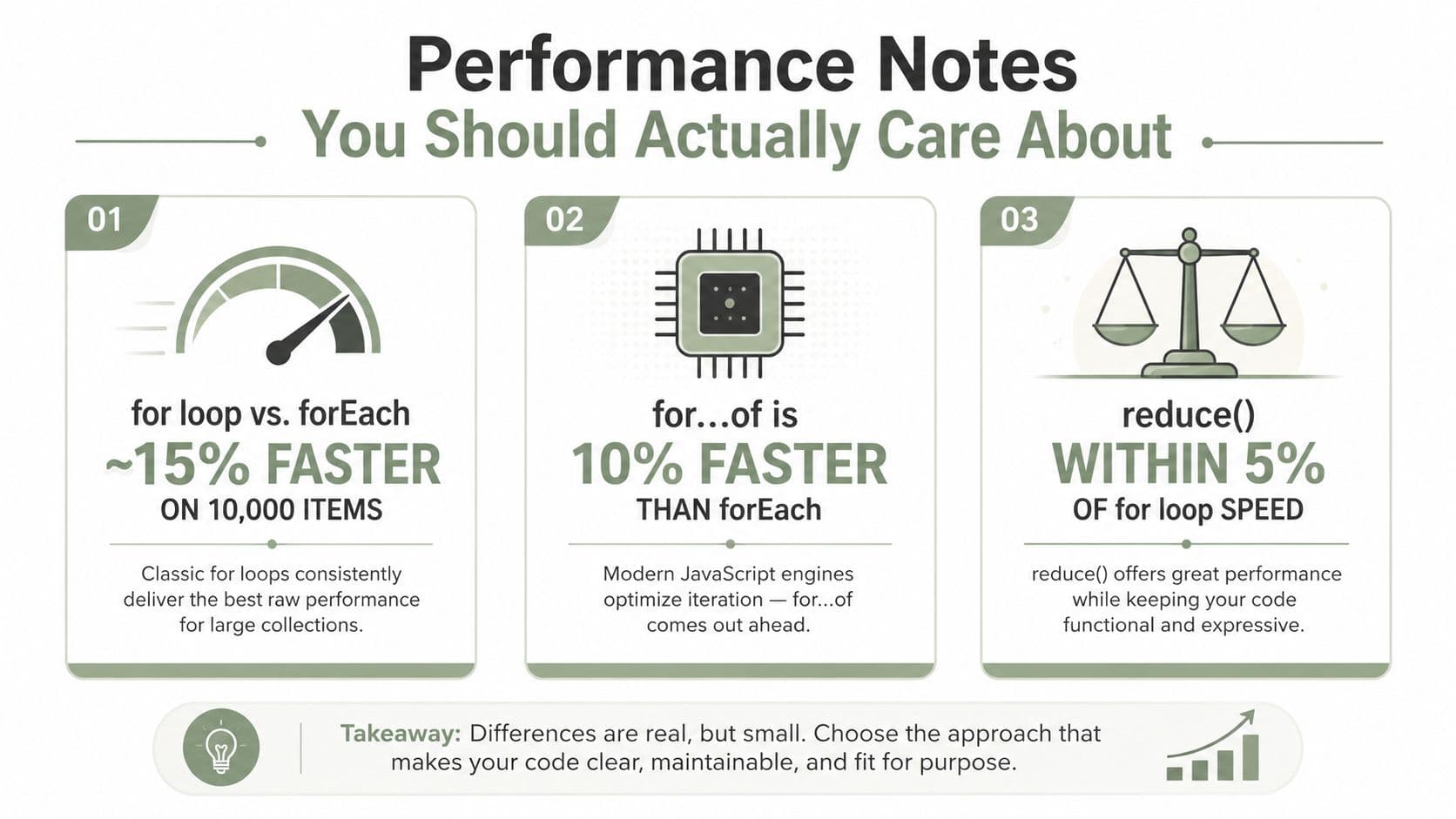
People love to turn array iteration into a benchmark contest, but most application code doesn't need that level of obsession. The one published comparison benchmark in the verified data built an array with 1,000,000 elements, ran each method 10 times, measured with performance.now(), and concluded that a classic for loop with length caching was the fastest way to iterate over an array dev.to benchmark comparison. That matters, but only in the right context.
Speed matters when the loop is hot
If you're iterating a massive array inside a tight render path, a data-processing job, or a loop that runs every time a user types, the classic indexed for loop is still the safest performance baseline. That's the practical takeaway from the benchmark-style comparison above. It doesn't make forEach(), for...of, or reduce() “slow” in some absolute sense, it just means the simplest indexed loop remains the best bet when raw throughput is the problem.
Readability wins in normal app code
For regular application logic, the tradeoff usually points the other way. forEach() is easy to scan for side effects. map() and filter() make data-shaping intent obvious. for...of gives you modern readability without hiding the control flow behind callback parameters.
That's why performance advice should start with profiling, not preference. If a loop isn't a bottleneck, the cleaner method is usually the better engineering choice because future maintainers will understand it faster.
Rule of thumb: use the most readable method first, then switch to indexed
foronly if profiling proves the loop is worth optimizing.
Custom Iterators, Generators, and Choosing Your Pattern
A ticket comes in and the data is not a plain array. Maybe you are walking a paginated API response, reading records from a parser, or feeding work items into a pipeline one at a time. That is where custom iteration starts to matter, because the question is no longer “how do I loop,” it is “what shape of loop matches the job.”
for...of works with any iterable, and that makes custom iteration practical instead of academic. If you define Symbol.iterator on an object, or build a generator that yields values one at a time, you can make your own data structures behave like arrays in a loop. That gives you a clean way to process stream-like sequences without forcing everything into a plain list first.
A generator is a clean way to yield work
Generators fit tickets where the next value should appear only when the consumer is ready for it. A generator can yield processed records one by one, and for...of can consume them in order without the caller knowing how the values were produced. That keeps the producer and consumer loosely connected and avoids loading the whole result into memory up front.
Custom iterables also make an API feel native to JavaScript. A team member can loop over your object the same way they loop over an array, which lowers the amount of special-case code they need to remember. That is the true value of custom iteration, not novelty, but making the common path easier to read and reuse.
A decision checklist that holds up on tickets
When a ticket lands, the right pattern usually follows the job you need to finish.
- Need to transform each item into a new array? Use
map(). - Need to keep only some items? Use
filter(). - Need one accumulated result? Use
reduce(). - Need a side effect on every item, like logging, DOM updates, or sending metrics? Use
forEach(). - Need to stop early when you find a match or a failure? Use
for...ofor a classicforloop, because those let you break out cleanly. - Need to work with an iterable that is not an array? Use
for...ofor a custom iterator.
That is the framework I would hand to a junior developer before a code review. It keeps the discussion tied to the work in front of you, not to personal preference. If the shape of the iteration matches the shape of the output, the code usually stays easier to reason about when the next ticket lands.
A few ticket-style examples make the choice clearer. If you are normalizing API responses into a new list, map() fits. If you are removing invalid rows from imported data, filter() is the right tool. If you are computing a running total for a checkout summary, reduce() earns its keep. If you are just firing a callback for each row, forEach() is fine. If you need to bail out as soon as you find the first banned item or the first matching record, use for...of or for so you can stop without extra ceremony.
The practical rule is simple. Start with the pattern that matches the job, and only reach for custom iteration when the source is not already a plain array or when you want lazy, one-item-at-a-time behavior. That keeps your code honest about what it is doing and avoids building more structure than the ticket needs.
Next in the tray
Mastering Your Coding Practice Test: Proven Strategies 2026
A coding practice test scores behavior, not style. How hidden acceptance tests actually work, and how to prepare for the checks that decide whether you pass.
Read the file →
Complex in Python: A Practical Guide to Complex Numbers
What the j suffix means, when to reach for the built-in complex type, cmath or NumPy, and the branch-cut edge cases that quietly break numeric code.
Read the file →