Python
Complex in Python: A Practical Guide to Complex Numbers
What the j suffix means, when to reach for the built-in complex type, cmath or NumPy, and the branch-cut edge cases that quietly break numeric code.

You're staring at a Python file that mostly makes sense, then one line stops you cold: 3+4j. Maybe it came from a DSP script, a physics notebook, or a codebase someone else handed you. The good news is that complex numbers in Python aren't mysterious once you see what they represent and when you should use the built-in type, cmath, or NumPy.
Why Complex Numbers Show Up in Real Python Code
The first time a developer sees a complex value in production, it usually isn't in a math lesson. It shows up in a waveform pipeline, a control-system script, or a notebook that someone swore was “just a little analysis.” Then the number ends with j, and the natural reaction is, “Why is Python printing imaginary units in my data?”
At a practical level, a complex number is a pair of real values packaged into one object, one part for the real axis and one for the imaginary axis. Python treats that as a first-class numeric type, so you can add, multiply, compare representations, and pass values through math code without building your own two-field class.
The mental model that keeps things sane
If you're debugging code, think of a complex number as a compact way to carry magnitude and direction through calculations. That's why it turns up in signal processing, engineering, and some scientific code paths, where phase matters just as much as size.
Practical rule: if the code talks about phase, rotation, impedance, or frequency, expect complex values somewhere in the stack.
Python includes complex support because these problems are common enough that making you reinvent the wheel would just add bugs. You'll often encounter them when reading numeric output from simulation code, FFT-related workflows, or any library that models oscillation and rotation.
The important habit is to stop treating the j suffix like a special case. It's not a trick. It's Python's built-in notation for the imaginary component, and once you recognize it, the rest of the syntax becomes much easier to read.
Creating Complex Numbers with the Constructor
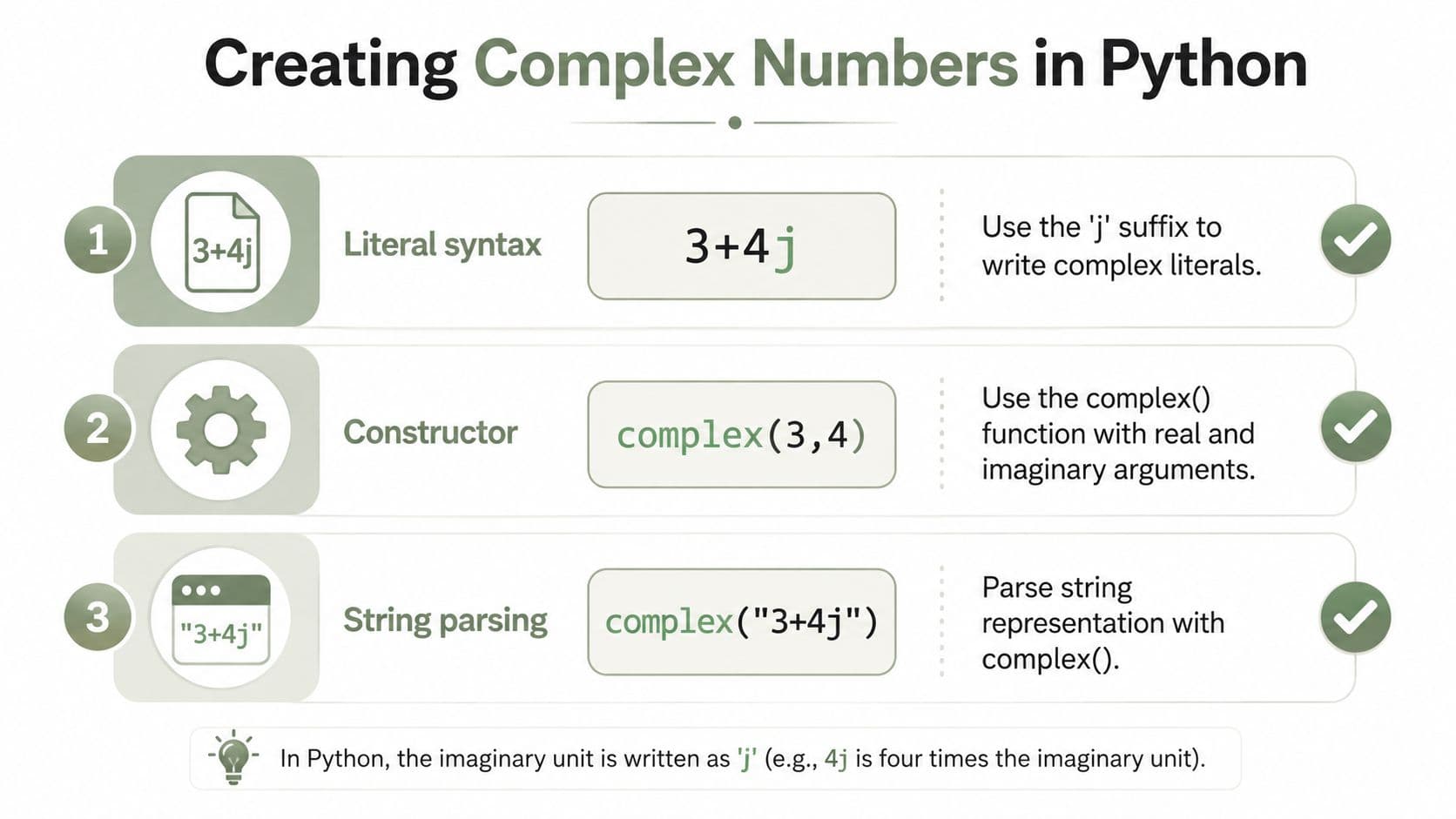
Python gives you three valid ways to create a complex value, and they're not as interchangeable as they look at first glance. The safest place to start is the literal form, because it reads naturally and makes the j suffix obvious.
z1 = 3 + 4j
z2 = -2j
z3 = 5
You can also build one with the constructor, which is where many developers get surprised by the rules. The accepted signatures are complex(number=0, /), complex(string, /), and complex(real=0, imag=0). In plain terms, Python lets you pass a number, parse a string, or provide separate real and imaginary parts. The stricter part is that this constructor does not behave like a loose “convert anything numeric-ish” helper.
The constructor rules that catch experienced developers
A direct constructor call looks like this:
z = complex(3, 4)
String parsing works too:
z = complex("3+4j")
That parsing route is handy when you're reading text data or configuration, but it only works if the string is in a form Python understands. The constructor contract matters because as of Python 3.14, you can no longer pass a complex number as real or imag. If your older code did something like complex(other_complex, 0), that pattern can break during migration, and custom __complex__ implementations may need attention too. The behavior is documented in the built-in type reference used by many developers as a migration guide, and the restriction is called out clearly there. See the constructor notes in Real Python's reference for complex.
Migration note: if a code path already holds a complex number, pass it as a single positional argument with
complex(number)rather than trying to split it acrossrealandimag.
That distinction matters in real code reviews. A constructor that looks permissive can still reject the wrong shape of input, especially when old utilities were written against looser behavior. If you're refactoring numeric code, trace the call sites carefully and confirm whether you're converting a scalar, parsing a string, or preserving an existing complex value.
Arithmetic and Built-In Methods Explained
A complex number in Python behaves like a two-part numeric value, so the arithmetic stays familiar if you keep both parts in view. Addition and subtraction combine the components directly, multiplication follows the usual complex-number rules from algebra, and division uses the same numeric behavior Python applies to its other built-in number types.
| Operation | Example | Result |
|---|---|---|
| Addition | 3+4j + 1-2j | 4+2j |
| Subtraction | 3+4j - 1-2j | 2+6j |
| Multiplication | (3+4j) * (1-2j) | 11-2j |
| Division | (3+4j) / (1-2j) | -1+2j |
| Power | (1+1j) ** 2 | 2j |
| Magnitude | abs(3+4j) | 5.0 |
Python also gives you direct access to each part of the value.
z = 3 + 4j
z.real     # 3.0
z.imag     # 4.0
z.conjugate()  # (3-4j)
What Python stores under the hood
Python's built-in complex type stores a number as two IEEE-754 double-precision values. At the C level, the Py_complex structure is defined as typedef struct { double real; double imag; } Py_complex;, so each component has about 15–17 decimal digits of precision and the type is aimed at numerical work, not arbitrary-precision math. That matters if you chain many operations and expect exact symbolic behavior. The implementation details are documented in the Python C API complex type reference.
A common source of confusion for junior developers is that complex still uses floating-point math in both parts. It is practical and fast, but it is not exact decimal arithmetic. If your workflow depends on exact decimal values, you need a different tool.
You can also read magnitude with abs() and phase with math libraries, but the right choice depends on whether you are handling one value or many. The next section compares those choices for scalar versus array data.
Choosing Between Built-In Complex, cmath, and NumPy
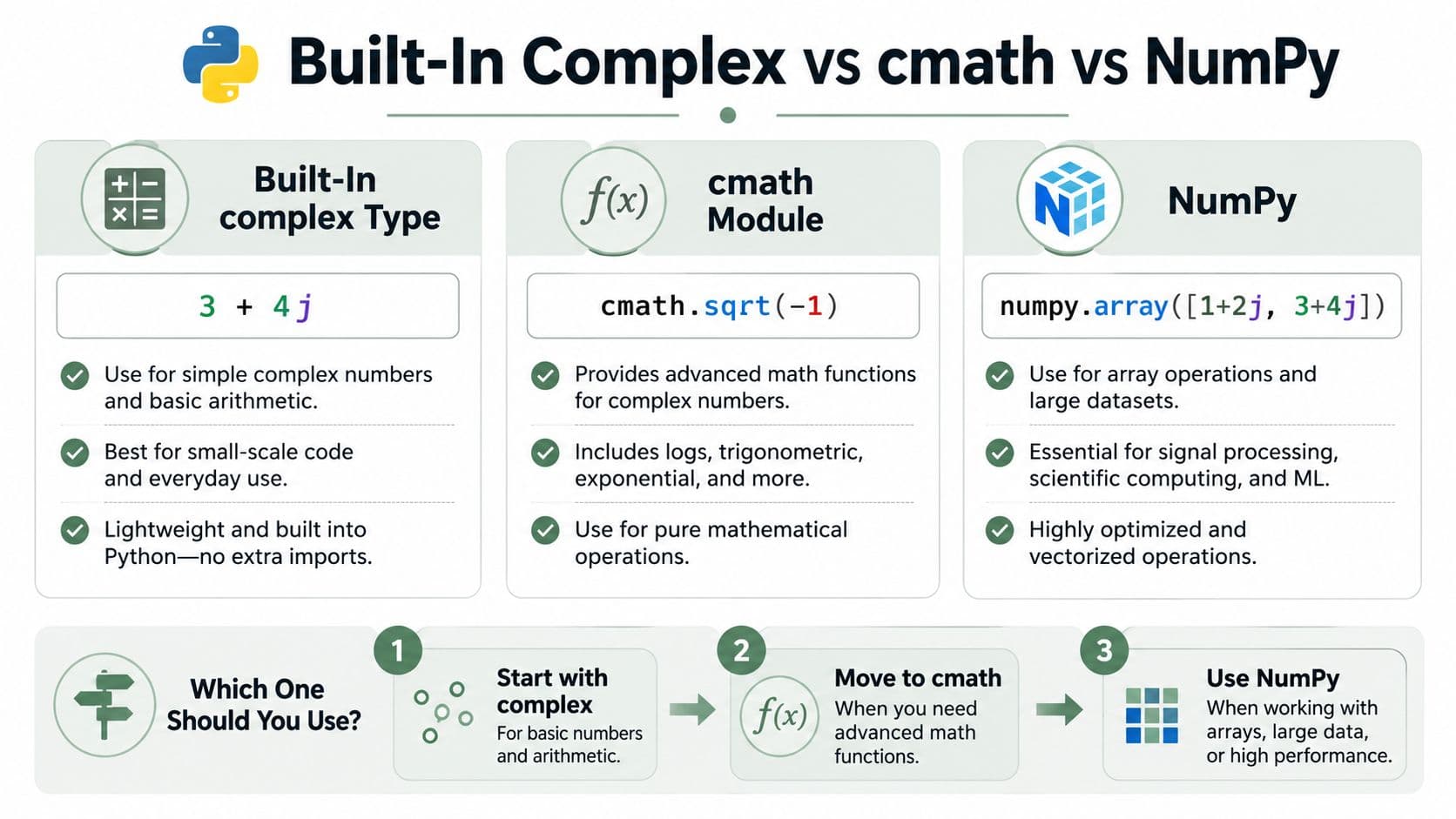
The decision most tutorials skip is not “how do I compute a complex value,” it's “which tool matches the shape of my data.” For a single value, the built-in complex type plus cmath is usually the cleanest path. For array-like data, NumPy is the better fit because its APIs are vectorized by design.
Scalar math versus array math
Use the built-in type when you need basic arithmetic on one value.
z = 3 + 4j
magnitude = abs(z)
Use cmath when you need scalar complex functions like square roots, phase, or polar conversion.
import cmath

z = 3 + 4j
phase = cmath.phase(z)
root = cmath.sqrt(z)
Use NumPy when the values are in arrays and the same operation must apply to many elements at once.
import numpy as np

values = np.array([1+2j, 3+4j, -2+1j])
angles = np.angle(values)
The practical difference is that numpy.angle() is explicitly vectorized for array-like inputs, while cmath is the standard library choice for scalar complex math. NumPy's angle extraction returns radians by default unless you pass deg=True, and its principal value convention is in the −π to π range. That framing is part of why NumPy fits signal-processing and scientific code so well, especially when the input is a sequence rather than a single number. See the NumPy angle documentation.
The rule of thumb that saves refactors
If you start with one number and later grow into arrays, don't rewrite the math first. Rewrite the data shape first. A lot of “why does this fail with NumPy” bugs happen because someone copied scalar code into an array pipeline and assumed the APIs would behave identically.
Simple rule: start with
complexandcmathfor one value, move to NumPy when the problem becomes batch-oriented or signal-oriented.
That's the tradeoff. cmath gives you the standard-library scalar toolbox, and NumPy gives you array semantics that are meant for scientific workloads. Use the smallest tool that fits the data shape, not the one with the most functions.
Phase, Branch Cuts, and the Edge Cases That Break Your Code
Complex math gets weird at boundaries, and that weirdness is where production bugs hide. Python's docs explicitly note that complex functions have branch cuts and discontinuities, which means some inputs map to a principal value rather than a continuously smooth result. Tutorials often stop at magnitude and angle formulas, then leave readers alone when the number jumps near the negative real axis.
Why angles can “flip” without the code changing
Both cmath.phase() and numpy.angle() encode a principal value convention in the −π to π range. That is useful because it gives you a standard answer, but it also means the phase can jump when values cross a boundary. If your code normalizes angles and then compares neighboring samples, that jump can look like a sign error or a math bug when it's really a branch-cut effect.
A common debugging pattern looks like this:
import cmath

a = complex(-1, 0)
b = complex(-1, -0.0)

cmath.phase(a)
cmath.phase(b)
Those values can land on different sides of your mental model even though the numbers look almost identical when printed. The problem isn't Python being inconsistent. The problem is that the complex plane has conventions, and principal values enforce one of them.
The Python cmath documentation calls out branch cuts and discontinuities directly, which is the part most quick-start guides leave out. That's the detail you want in your head when a phase trace suddenly wraps or a polar conversion looks “wrong” after normalization.
Debugging the failure mode instead of the formula
If a plot looks discontinuous, check three things first.
- Boundary crossings: Values near the negative real axis can trigger a principal-value jump.
- Normalization code: A manual wrap step can turn a valid phase into a misleading one.
- Scalar versus array APIs:
cmath.phase()andnumpy.angle()both return principal phases, but they behave in different data contexts.
The fix is usually not to “force continuity” with a quick patch. It's to decide whether the jump is mathematically expected and, if needed, unwrap or post-process the phase deliberately. That's a design choice, not a cleanup task.
Real-World Applications in Signal Processing and Engineering
Complex numbers earn their keep in work that tracks oscillation, direction, and rotation. In signal processing, they represent amplitude and phase together, which makes them a natural fit for frequency-domain work. In electrical engineering, they show up in impedance and AC analysis because the math models both resistance and reactance in one expression.
A lot of Python code in these domains starts simple, then scales. A single phasor might live comfortably as a built-in complex, but an audio pipeline or spectral analysis step usually wants NumPy arrays so you can apply the same calculation across samples. The array shape determines the library choice more than the topic does.
Small examples that map to real work
A scalar impedance value can be handled with the built-in type and cmath when you're reasoning about one circuit element at a time.
z = 10 + 5j
magnitude = abs(z)
A phase comparison in a control script can use cmath.phase() when you only care about a single measurement.
import cmath

phase = cmath.phase(3 + 4j)
An FFT-related workflow, on the other hand, naturally lands in NumPy because you're working with sequences of samples, not one number.
import numpy as np

spectrum = np.array([1+0j, 2-1j, -3+4j])
angles = np.angle(spectrum)
This is also where the branch-cut discussion becomes practical. If you're reading a spectrum and a phase plot seems to jump, you don't automatically have a bad transform. You may just be hitting the principal-value convention that the earlier section described.
The big takeaway is that complex numbers aren't an academic detour in Python. They're a compact representation that helps you keep math code readable when the domain needs direction, rotation, or phase. Once you know the right library for the data shape, the rest becomes much easier to reason about.
Common Mistakes and How to Avoid Them
The most common failure is choosing the wrong API for the job. A second trap is treating every complex value like a real number with an extra suffix, which leads to awkward comparisons, confusing phase results, and code that behaves differently once it leaves a notebook.
- Constructor confusion:
complex(real, imag)expects numeric pieces that it can combine directly. If you pass a value that already carries a complex part, check whether you should convert the input first or keep the call to a single complex argument. - Precision drift: Repeated operations can make neat decimal values look messy because each component still uses floating-point precision. That is normal behavior, but it can surprise you when you compare intermediate results too strictly.
- String parsing surprises:
complex("3+4j")only works when the text matches Python's expected format. Leading spaces, alternate separators, or malformed signs can fail even when the value looks obvious to a person reading it. - Wrong imaginary unit: Python uses
j, noti. - Bad comparisons: Complex numbers do not support
<or>the way scalar real numbers do. If you need ordering, compare a real property such as magnitude instead of the full value. - Phase convention mix-ups:
cmath.phase()returns a scalar angle for one value, whilenumpy.angle()is usually used on arrays and can behave differently when you are reading many samples at once. If you switch between them without checking the shape and return type, phase plots can look “off” even though the math is doing exactly what the library promised. - Using
abs()on arrays the wrong way:abs(z)is fine for a single complex number, but a NumPy array changes the story. On arrays,abs()applies elementwise and gives magnitudes for each entry, so code that expects one scalar can break when the input becomes vector-shaped.
The safest decision framework is simple. Use built-in complex for straightforward scalar values, reach for cmath when you need scalar functions like phase or square roots, and switch to NumPy when your data is array-shaped or you are working in signal-processing style code. If you keep that split in mind, you avoid the bugs that appear when a one-value example is copied into production without checking how phases, return shapes, or array math behave.
If you are comparing phase results from different libraries, check the input type first, then the output convention. That habit catches the kind of silent mismatch that is hard to spot in a spectrum plot and easy to ship by accident.
Next in the tray

Mastering Your Coding Practice Test: Proven Strategies 2026
A coding practice test scores behavior, not style. How hidden acceptance tests actually work, and how to prepare for the checks that decide whether you pass.
Read the file →
JavaScript Iterate Over Array: Proven Patterns for 2026
for, for...of, forEach, map, filter, reduce and custom iterators — which array iteration pattern fits the job, and where each one starts fighting you.
Read the file →